🏠Mask -> Generate -> Re-mask

Remove People from Real Estate Photos

Get the masking boundary right first, then decide model strategy. Fully mask the people you want removed and run AI edit once. If results are off, regenerate first; then try Pro; then tune custom prompt only if needed. Default prompt behavior is already active for marked-area people removal and scene-consistent background fill. In low-person scenes, one pass is usually enough. In crowd-heavy scenes, multiple rounds are normal.

Remove People from Real Estate PhotosTravel Photo CleanupGroup Photo Cleanup
🎁Beta Early Access: Enjoy 4 FREE daily generations (Fast Model)! No login required.
First time here? Watch 30s tutorials
Learn correct masking for higher success rate

After uploading, fully mask the whole person (including edges/contact areas), then generate.
If masking is incomplete, leftovers are common. Regenerate first, then switch to Pro or add small prompt refinements on top of the default prompt.

Accurate mask boundaries drive better results

Mask what should be removed completely, and keep non-target areas out of the mask.

One-pass priority for low-person scenes

Single-person or small-group scenes often finish in one pass; crowd-heavy scenes naturally need more rounds.

Use a clear fallback order

If first output is not ideal: regenerate first, then try Pro, then tune custom prompt only if still needed.

Before and After: Real Estate Listing Photo Cleanup

Kimono Couple in Courtyard: Mask Both Fully

Input issue: a kimono couple is drinking tea in the inn courtyard, and you need a clean background image. Mask strategy: use a large brush and fully mask each person separately. Generate strategy: run one AI edit pass first. Ideal outcome: one pass is enough. Fallback: regenerate if output looks abnormal.
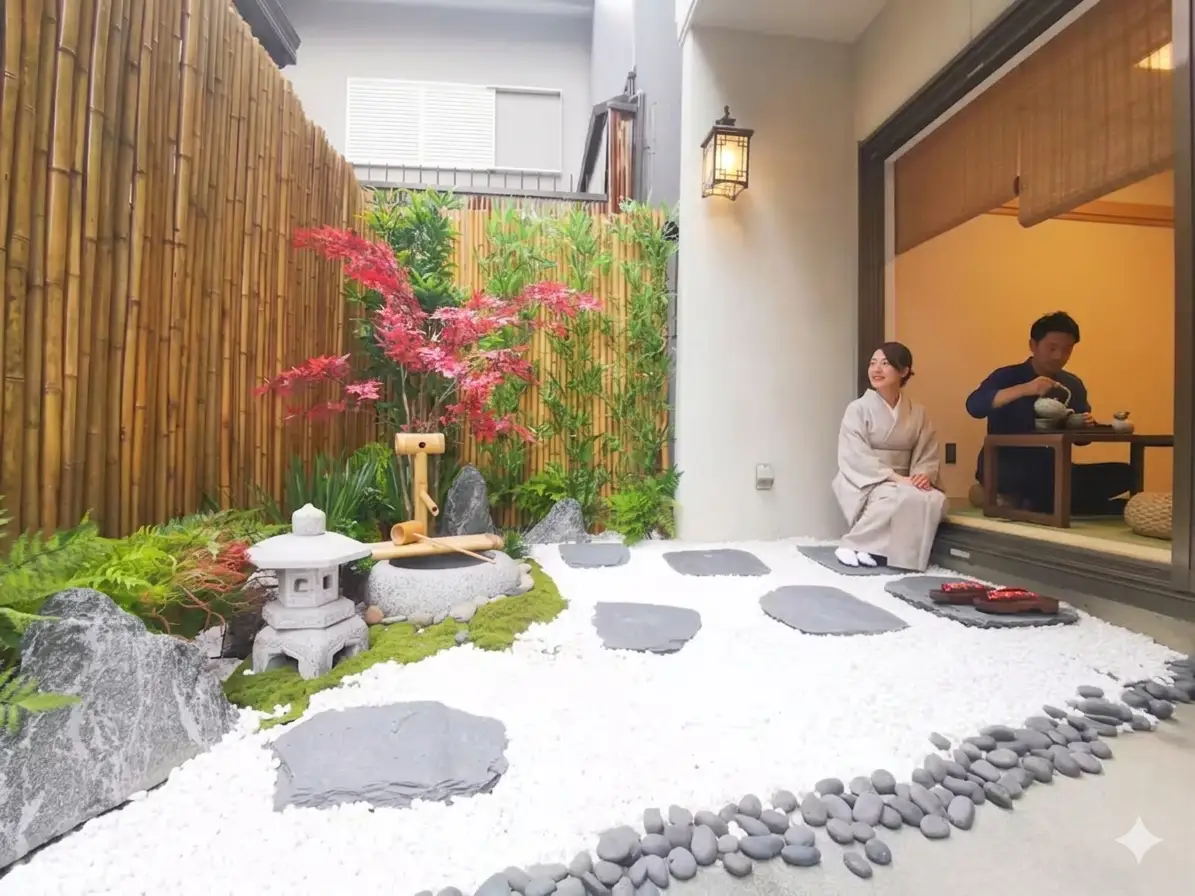
Before removing guests from a ryokan courtyard listing photo
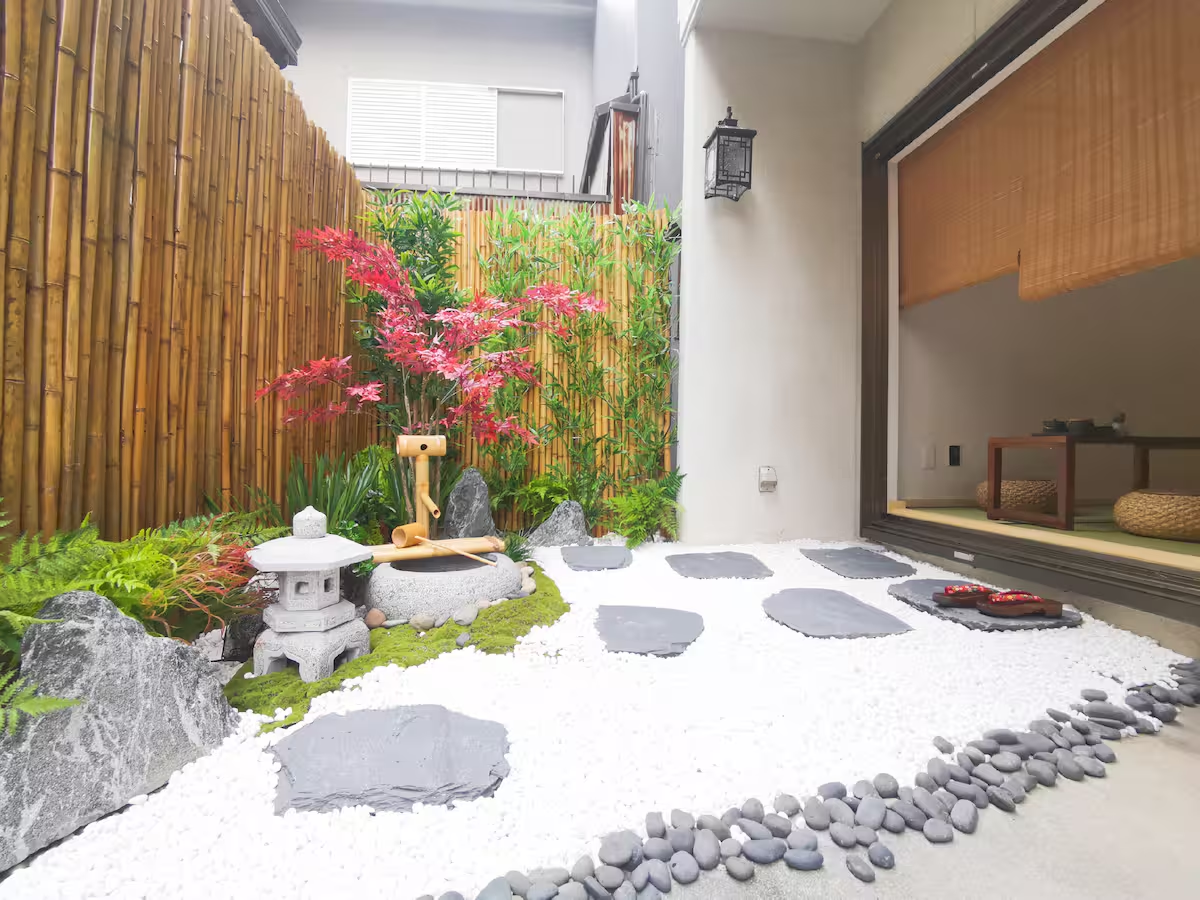
Before
After removing guests from a ryokan courtyard listing photo
After

Living Room Man + Book: Do Not Mask the Chair

Input issue: one seated man appears in the living room image. Mask strategy: fully mask the man including the book in his hand, but do not mask the chair to avoid deleting it. Generate strategy: run one pass first. Fallback: if quality is poor, switch to Pro directly.

Before removing a person from an apartment living room listing photo
Before
After removing a person from an apartment living room listing photo
After

Indoor Family of Four: Mask All Four Individually

Input issue: a family of four appears indoors and all four should be removed. Mask strategy: fully mask each of the four people before running AI edit. Generate strategy: low-person scenes like this usually finish in one pass. Fallback: if needed, tune custom prompt or switch to Pro.

Before removing multiple people from a vacation rental lounge photo
Before
After removing multiple people from a vacation rental lounge photo
After

3 steps to remove people from real estate photos

1

Fully mask targets (and required attachments)

Mask each target person completely. Include required attached objects when needed (for example, a book in hand). Do not mask objects you want to keep (for example, a chair).

2

Generate once and judge result

Run one AI edit pass and evaluate. Low-person scenes are often one-pass. High-density scenes may require multiple rounds.

3

Follow fallback order if needed

Not satisfied? Regenerate first. Still not good? Switch to Pro. Still not enough? Then tune custom prompt.

Occasional listing cleanup: choose Pack S or Pack M (credits never expire). Weekly high-volume editing: Monthly 250 is usually better value.

Unlock Pro and Original Downloads

Choose one-time packs for low-frequency work, or subscribe monthly for recurring usage.

Pack S

Low entry, try paid

$3.99/once
12 estimated images
50 credits
≈12 Fast or 5 Pro
  • 50 credits
  • Unlock Pro model
  • Download Original (no compression)
  • Credits never expire
MOST POPULARBEST VALUE

Pack M

Most popular one-time pack

$9.99/once
50 estimated images
200 credits
≈50 Fast or 20 Pro
  • 200 credits
  • Unlock Pro model
  • Download Original (no compression)
  • Credits never expire

Pro Monthly

Best for frequent usage

$9.99/month
62 estimated images
250 credits
≈62 Fast or 25 Pro
  • 250 credits per month
  • Renews monthly
  • Unlock Pro model
  • Download Original (no compression)
  • Monthly credits top-up
  • Cancel anytime

One-time packs never expire. Monthly refills 250 credits every billing cycle.

30-day money-back guarantee

Real Estate Photo Cleanup FAQ

If mask boundaries are already correct and issues are minor, regenerate first. This is usually the fastest fix before changing model or prompt.